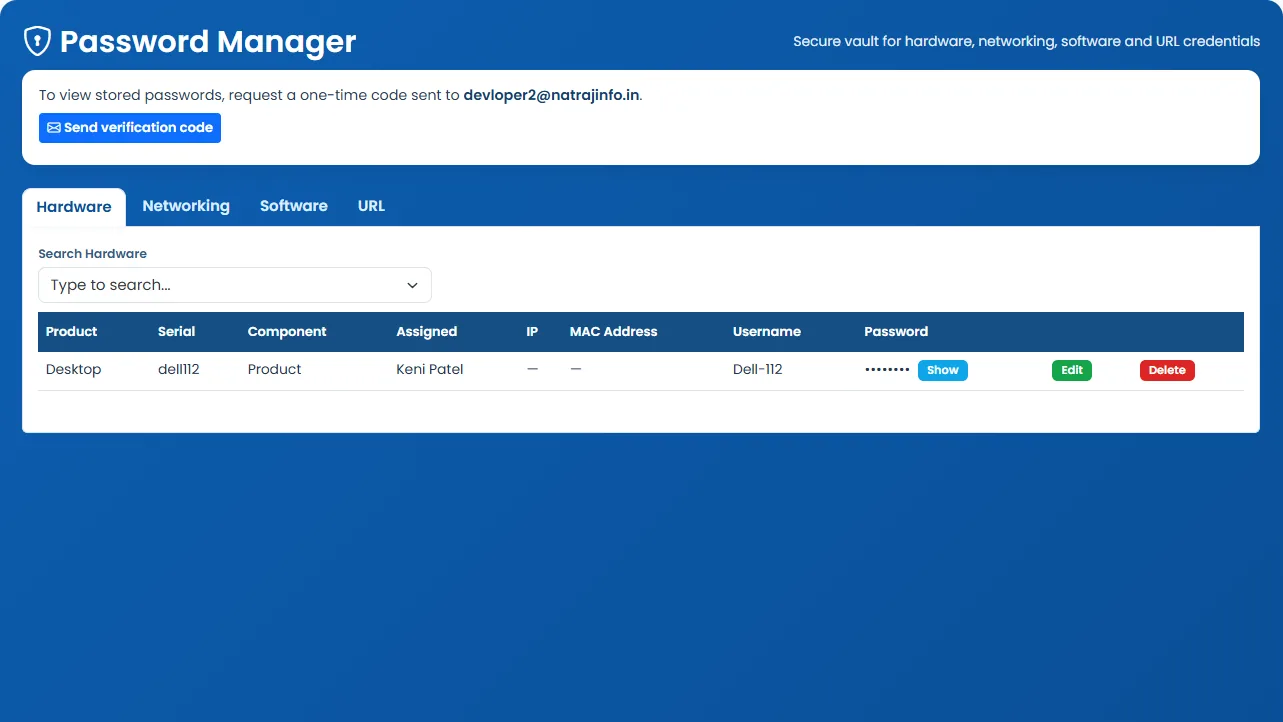
Password Manager
The Password Manager acts as a controlled credential vault for operational records tied to hardware, software, and web services. Access is protected through OTP-based reveal steps and scoped visibility.
What it does: Secure storage for hardware, software, and URL credentials with OTP verification before reveal.
Key capabilities
- Store and manage hardware credentials.
- Store and manage software credentials.
- Store, import, export, update, and delete URL credentials.
- OTP send, verify, and reveal flow for secure credential access.
- Equivalent password manager access in the custom admin console.
How to use
- 1 Open Password Manager from the sidebar.
- 2 Choose credential type: hardware, software, or URL.
- 3 Add credentials with scoped visibility for authorized roles only.
- 4 When viewing a protected entry, request an OTP to your registered channel.
- 5 Enter the OTP to temporarily reveal the credential.
- 6 Import or export URL credentials in bulk when migrating records.